

At 1am, my phone rang. It was a friend of friend calling. The first words I heard from her were “get a pencil and start writing.” She informed me that my friend was in the process of being arrested outside her home. Naturally the first questions that came to mind are why is she being arrested and what is going on, but instead the first two questions I asked were “which department is arresting her?” and “which facility are they taking her to?” The why and how of the situation can be answered in due time. In those moments, the fact is that your loved one is being arrested, you’re powerless to stop it, and you need to know where they are being taken. “To jail” is both an obnoxiously obvious and vague answer. You likely live somewhere with multiple jails/detention facilities nearby. So, which jail? And are they being arrested by local, state, or federal authorities? The first step to getting your loved one released is knowing where they are.
In the following hours, her friend and I quickly discovered that we did not know what to do. We needed to get her out of jail, she needed a lawyer, and we needed to contact her family. Neither of us knew how to do any of those things. And all of this was compounded by the fact that it was 1am on a weekend.
Eventually, we got it sorted. My friend was released from jail the following day, the appropriate familial contacts were made, legal representation was established, and everything worked out. However, this was a wake up call that my emergency preparedness was severely lacking.
In retrospect, the only reason I knew to ask the questions about where she was being taken first and foremost was because earlier in the year I had watched an excellent talk by DeviantOllam regarding risk and preparedness, Lawyer. Passport. Locksmith. Gun.
I highly recommend watching the full talk. The topics he discusses are wide ranging and go into further depth than this blog post does. That said, just watching all of the preparedness videos in the world won’t actually help you if don’t take the steps to actually be prepared. The purpose of this post, therefore, is to discuss the actual implementation of a subset of the ideas covered in that talk as some of these are easier said that done. Specifically how to:
- Make emergency contact with a trusted person in an emergency without your phone (but with a phone)
- Set up an emergency phone number that rings multiple phones simultaneously
- Be the first responder for an emergency situation
- Know where your loved ones are at all times
Phone Numbers Cheatsheet
Say you are the one arrested. At the jail you’re given the opportunity to make a call. Who are you calling? I’ll bet you don’t know their phone number without looking it up in your contacts app. That’s a problem when you don’t have your phone, huh? Maybe the authorities will allow you to use your phone to get a phone number out of it, but guess what? Now you just unlocked your phone for them. Yikes. 😱
Fortunately, there’s a very simple solution to this: print out a physical piece of paper with all your most important contacts on it and keep it with your phone. If you have a phone case, it’s easy to stuff it inside the case. Here’s mine:
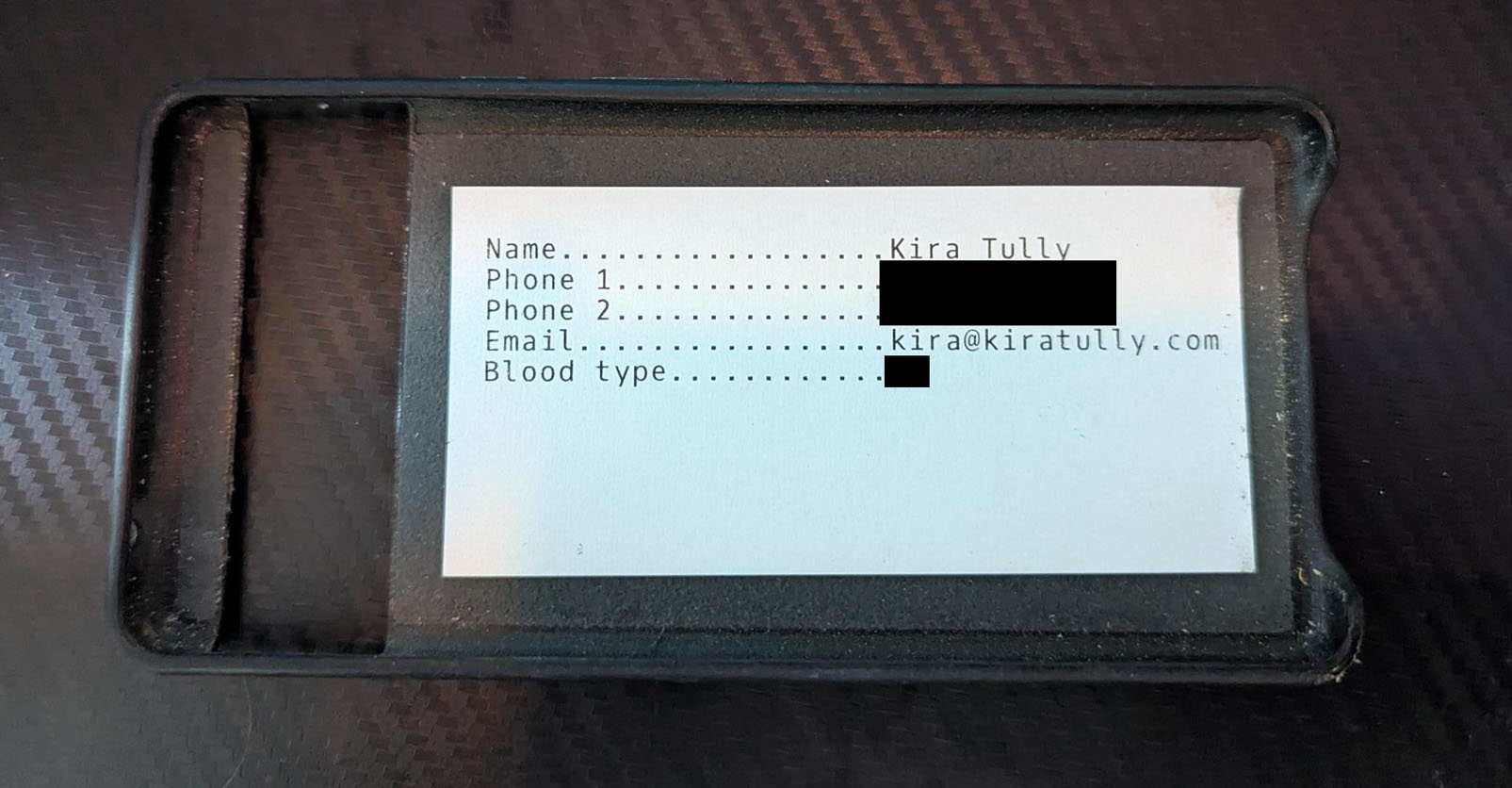
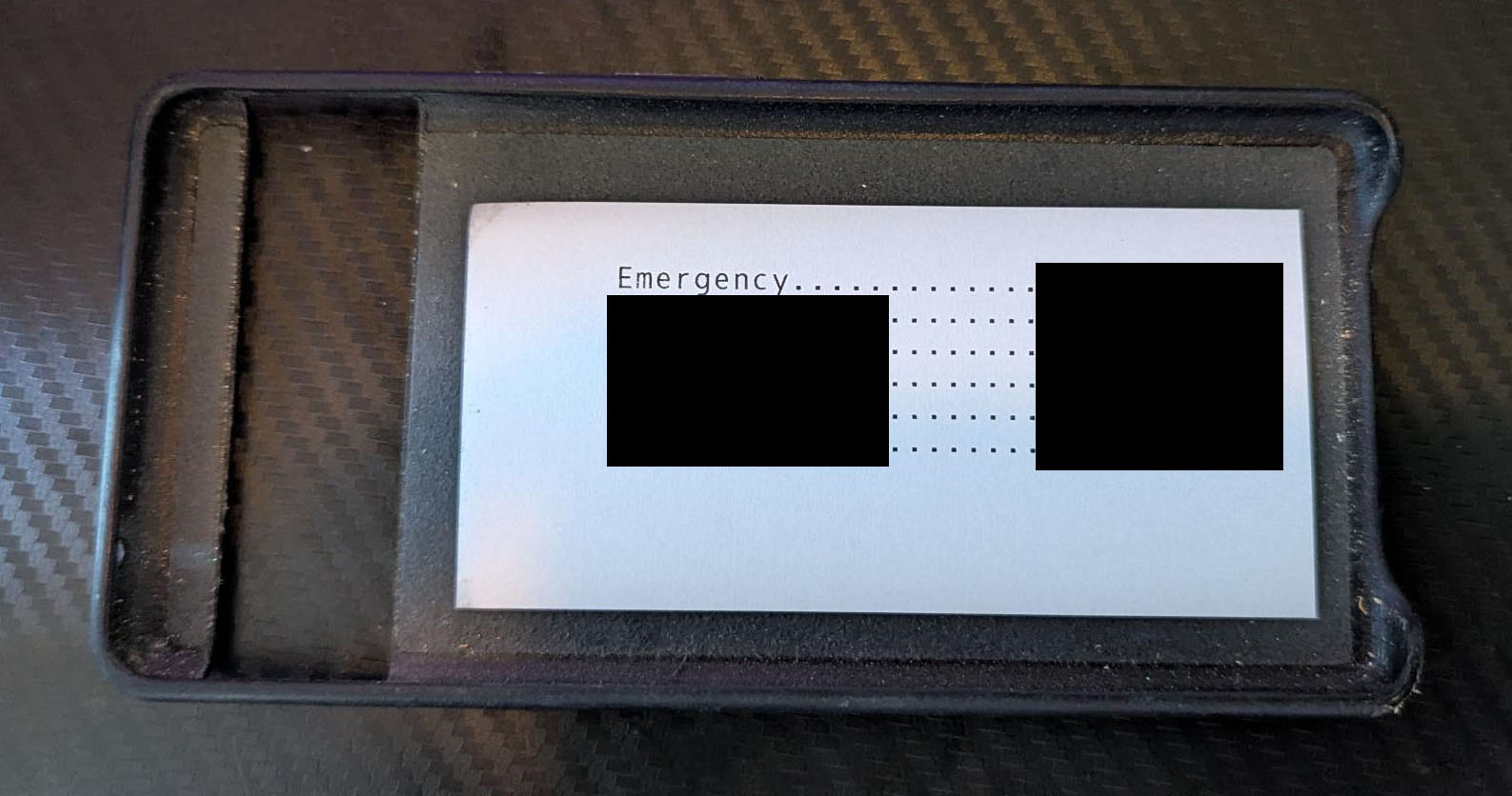 Yes, my phone case is dirty. Yours is too.
Here is a LibreOffice file to use as a template for making your own (print it double sided). The side with your own contact info is helpful in case your phone is lost and subsequently found by a Good Samaritan who wants to return it to you. Even if you put your contact info on the lock screen, has the battery died before your phone was found? A physical contact card avoids that problem.
Consider printing two: One for your phone and one for your wallet/purse. Having a backup in case your phone is lost or stolen won’t hurt.
But what’s that “emergency” number on the card? Well…
Emergency Phone Number
If you’re in an emergency situation it may not be feasible to run down a list of phone numbers hoping for someone to eventually answer. Hell, if you don’t have your cheatsheet from above you may not know a phone number to even call in the first place.
The idea of a custom emergency phone number is a special number that is easy to memorize and when called, rings the phones of multiple people simultaneously. The first one to answer is the one that takes the call. In an emergency, this maximizes the chance of getting in touch with someone as soon as possible. If you only memorize one phone number, this is it.
It’s somewhat tricky to set one of these up though so let’s go through how to do it. Fortunately, we can use a VoIP service for this. There are a plethora of VoIP services out there, but we want one that has the following features:
- Support call forwarding groups to at least, say, five phone numbers
- Uses per-use pricing rather than a flat monthly fee to minimize costs
- Gives control over incoming caller ID
After evaluating a bunch of services, the one I landed on was VoIP.ms as it had all the features I needed and charges per-minute of talk time for a given phone number. I initially put a $10 credit on my account and expect that to last for multiple years.
Setup
Here’s how the setup your own emergency number with VoIP.ms.
1. Create a DID Number
First you need to create a phone number, or DID Number. This will act as the phone number you call when it’s all set up.
VoIP.ms allows you to select a phone number from a list for your local area. Find one that looks easy to memorize.
First “order” the DID number from the Order DIDs page:

Once created, it should be listed on the Manage DIDs page:
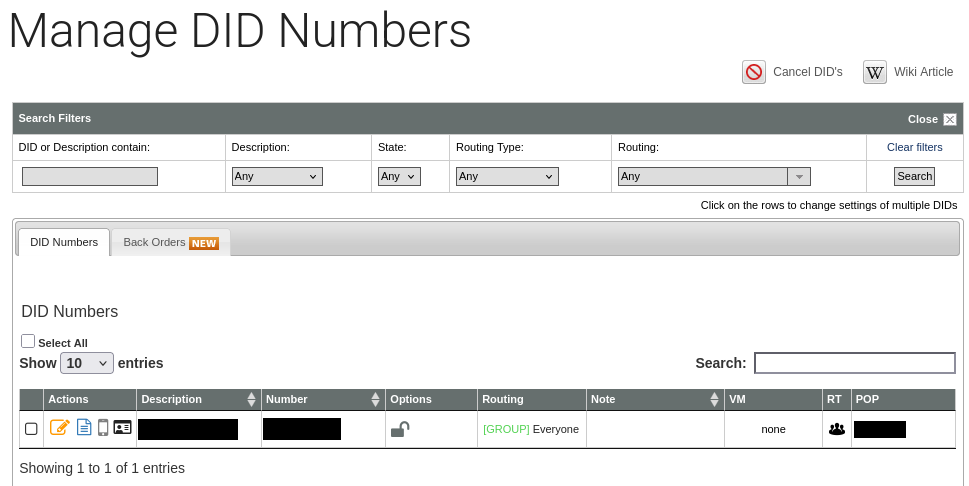
2. Create Call Forwarding Entries
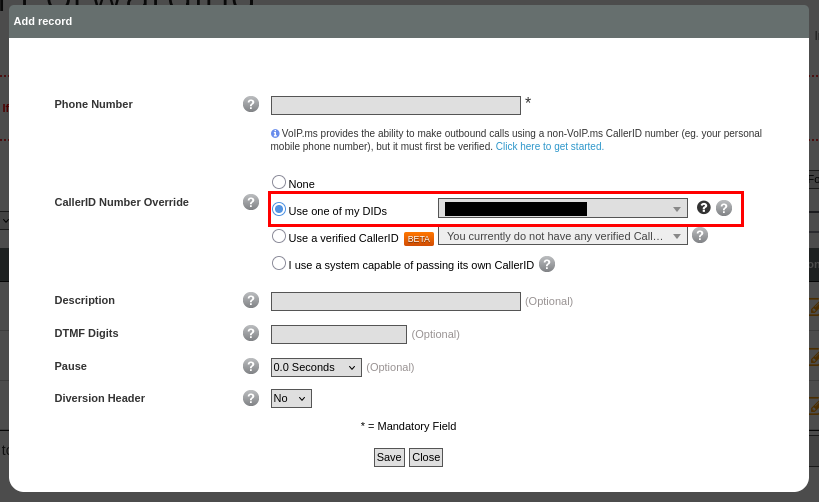
Now we need to add call forwarding entries for everyone who will be on the receiving end of calls. Set these up on the Call Forwarding page:
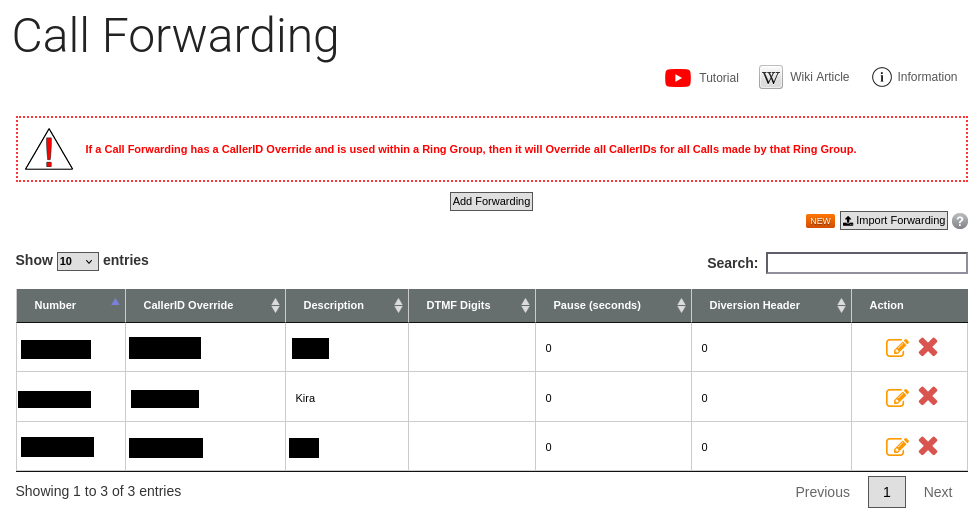
When adding these, be sure to set the CallerID Number Override to your DID. This will ensure that the caller ID on your phone will show up as your emergency number rather than the phone number of where the call is being placed. You will want to know it’s the emergency number calling instead of an unfamiliar phone number you’re likely to ignore as spam.
3. Create a Ring Group
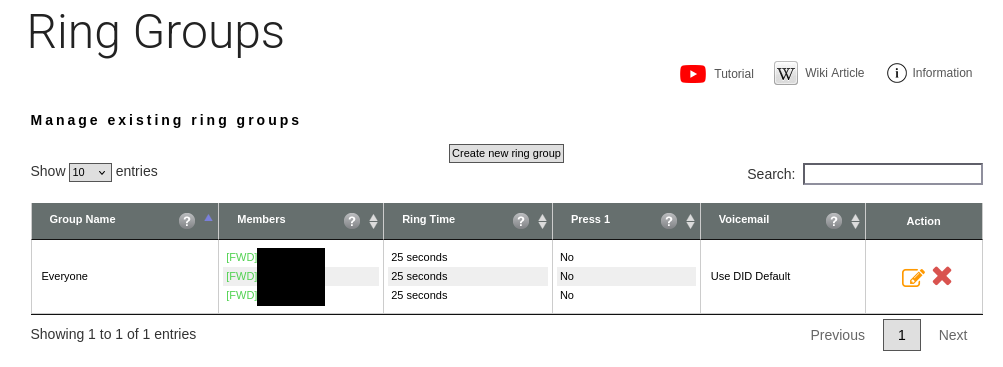
A Ring Group is the glue that brings all of the call forwarding entries together so that they may be all called simultaneously.
Note that VoIP.ms supports a maximum of 8 ring group members. This is somewhat limiting, but ideally with 8 people, someone is available to take a call at any given time.
From the Ring Groups page, add a new ring group and add all of the call forwarding entries previously created to it. The ring group can be named anything you like. I used “Everyone” in my setup.
4. Configure the DID
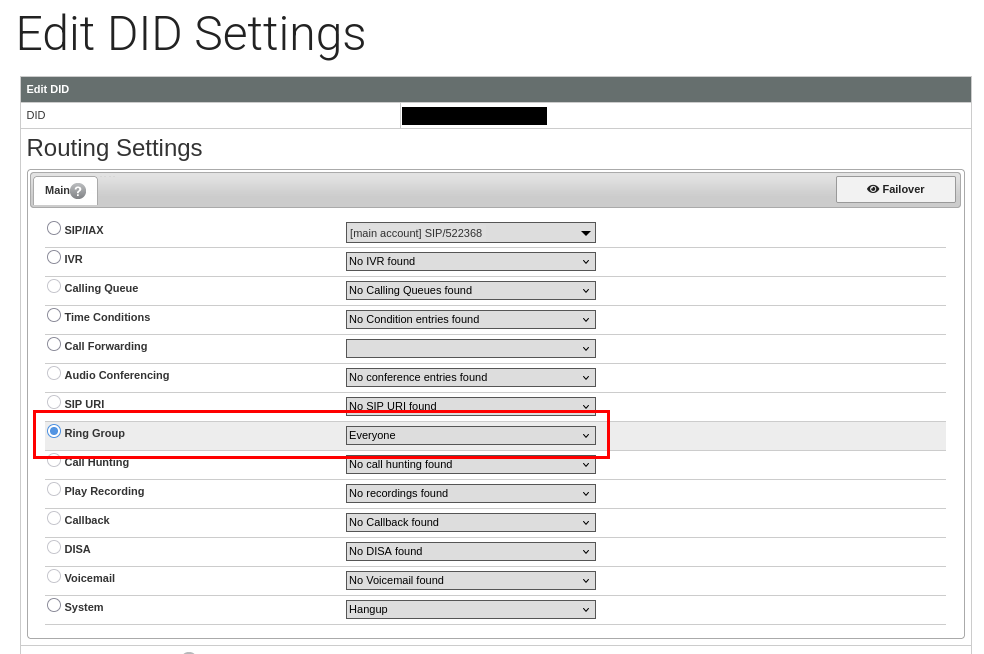
The last action we need to do is to configure the DID to forward calls to the ring group.
Back on the Manage DIDs page, edit the DID. Under the Routing Settings, select the Ring Group you previously created:
At this point you should be able to call your emergency number and have it forward the call to your phone! 🎉
(Google Voice is a good option if you need a separate phone number to test outgoing calls with.)
Usage
The philosophy here is “many can call, few will answer.” That is, you can give the emergency number to as many people as you see fit, but only a subset of them are responsible for answering and fielding responses to emergencies. This is for two reasons:
- The technical limitation of VoIP.ms only supporting a maximum of 8 call forwards in a ring group.
- The practical limitation of having too many cooks in the kitchen making a situation worse.
- Being on the receiving end is a responsibility, one that not everyone may want to take on. Only have calls forward to those willing and prepared to answer them.
On your end, there’s a few additional configurations you can make on your phone to ensure incoming calls catch your attention:
- Configure a separate ring tone for incoming calls from the emergency number. Something different from your normal ring tone is much more likely to get your attention.
- Save the emergency number as a contact named accordingly and have it set to bypass any Do Not Disturb settings you have configured. Answering someone calling at 3am is your responsibility as a member of the ring group.
- Create a monthly reminder to test it. An emergency procedure never tested is useless.
- As with all phone numbers, call spam will be an annoyance. From my experience, it hasn’t been too bad, but be prepared for fake calls occasionally. Assuming it’s tolerable, consider them an unscheduled test of your system. :)
Handling Emergencies
Alright so your emergency phone number was called. Now what? Again, none of this accomplishes anything if you’re still powerless to handle the situation. Say you have given this emergency number to your large group of friends and only five people are configured to answer. It’s not reasonable expect those five to know everyone else’s contacts.
I solve that problem by maintaining a shared spreadsheet of everyone’s contacts. The idea here is that the person who answers a call first gets the most pertinent information:
- Who is calling
- What is the emergency?
- Who else needs to be alerted?
For example, a legal emergency is going to require a different response than a medical emergency. Or maybe it’s something relatively benign like it’s 2am and your car won’t start far from home. The person answering the phone should first open the contacts spreadsheet and alert the caller’s relevant contacts.
In my case, we have a shared spreadsheet on Proton Drive. This spreadsheet contains fairly sensitive information, but it also needs to be accessible and up to date. I find this strikes a balance of accessibility and security. Your needs may differ.
With that in mind, before my emergency number is given to someone, they are asked to provide the following information to be added to the spreadsheet:
- Name
- Legal name
- Pronouns
- Phone Number
- Address
- Birthday
- Emergency Contact
- Family Contact
- Work Contact
- Lawyer Contact
- Health Insurance Co.
- Allergies
- Blood type
Not everyone will have all of these, but collecting as much as possible to handle various types of emergencies is best. For example, most people won’t have a lawyer contact, but my spreadsheet contains a separate sheet with various lawyer contacts that have been pre-vetted as good options to call for first-line-of-defense legal issues such as getting someone out of jail.
Note on the legal name: Sadly if your name differs from your legal name, realistically hospitals/jails/etc. are going to use your legal one. If you need to find someone, you need to know their legal name. This is the only time I ever ask for legal names and if someone doesn’t want to provide it, that’s fine.
Location Sharing
Knowing the precise location of your family/partner(s)/close friends at any given time can be a life saver. However, persistent access to your location is sensitive information to have. Unlike the emergency phone number above, this is something you likely only want to share with at most a handful of trusted people in your life. And from the technical side, you similarly want to trust whatever service is doing this location tracking.
To that end, I tried a few FOSS solutions. Namely, OwnTracks and Grid. I desperately wanted these to work and put a considerable amount of time into them, but sadly they both suffered from horrible battery drain issues, stale location data, or simply bugs that prevented reliable use. If you know of a reliable FOSS location sharing application, please let me know about it!
There are also numerous closed source location tracking applications, mostly marketed towards families to track their children. Being proprietary, for-profit, and closed source, I simply don’t trust them and did not consider them.
The compromise solution I ended up with was Google Maps. As an Android user, Google often has my location data already from Google Maps use when driving. I’m not crazy about giving them more data, but Google Maps location sharing was the only option that actually seemed to work consistently well enough.
Location sharing with Google Maps is easy enough to set up so there’s not much to going into it here. See Google’s Documentation for this.
You can also temporarily share your location for a set period of time making it useful for sharing with a group of people you are attending an event with to help with general logistics or handling emergencies while you’re there.
Closing Thoughts
As the saying goes, there are many ways to skin a cat and there likewise many ways to implement your own emergency protocols. You may do it differently and to a greater or lesser degree. Whatever you do though, do something before it’s an emergency and you have no plan.
For the entrepreneurial types among us, if think these type of tools are useful but the set up is too complex and time consuming, it feels like there’s a startup idea lurking here to offer a unified service for emergency phone number contacts and location sharing for one’s friends and loved ones.